


Updated: October 8, 2026
Key Takeaways
- FDA regulations require specific fonts and minimum sizes for nutrition facts labels.
- The FDA does not require a specific font for Nutrition Facts labels. Any easy-to-read type style may be used, provided it meets FDA formatting requirements.
- Minimum font sizes vary by label element and format. Standard Nutrition Facts labels generally require at least 8-point type for nutrient information, while 6-point type is permitted for certain headings and footnotes.
- Formatting errors can result in FDA non-compliance and penalties.
- MenuSano automates FDA-compliant label formatting for U.S. food businesses with ease.
Why Font and Size Matter in Nutrition Labels
Typography is a foundational aspect of FDA-compliant nutrition labelling. The FDA has set clear and enforceable rules on what fonts and sizes are allowed on food packaging. The primary goals are clarity, legibility, and accessibility, enabling consumers to make informed dietary choices.
Though often overlooked, typography ensures legibility, transparency, and compliance. A label that fails to meet the mandated font standards can result in regulatory penalties, product recalls, or marketplace rejections. This comprehensive guide explores the approved font styles, required font sizes, spacing requirements, and how to streamline the process using cutting-edge nutrition analysis software like MenuSano.
FDA Font Requirements for Nutrition Facts Labels
Accepted Font Styles
The FDA does not mandate a specific font for Nutrition Facts labels. Helvetica is commonly used in FDA examples, but other legible type styles are permitted.
Under 21 CFR 101.9(d), Nutrition Facts labels must use a single easy-to-read type style and follow the applicable requirements for font size, bold formatting, capitalization, and spacing.
Decorative or cursive fonts are not explicitly prohibited by name. However, any font used must remain legible and meet FDA formatting requirements.
Examples of Different Label Formats
Vertical Display with Micronutrients Listed Side-by-Side
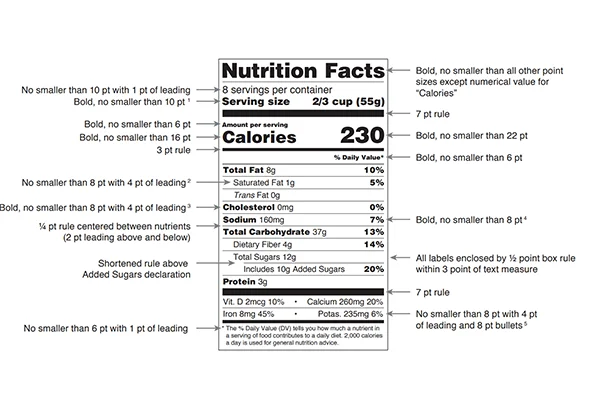
- Nutrition Facts: Bold, no smaller than all other point sizes except the numerical value for “Calories.”
- Serving Size: Bold, no smaller than 10 point
- Calories: Bold, no smaller than 16 point.
- Calories – Numerical Value: Bold, no smaller than 22 point.
- Divider: 3 point rule. These are example design specifications, not mandatory divider thicknesses.
- Micronutrients: Bold, no smaller than 8 point with 4 point of leading.
Tabular Format
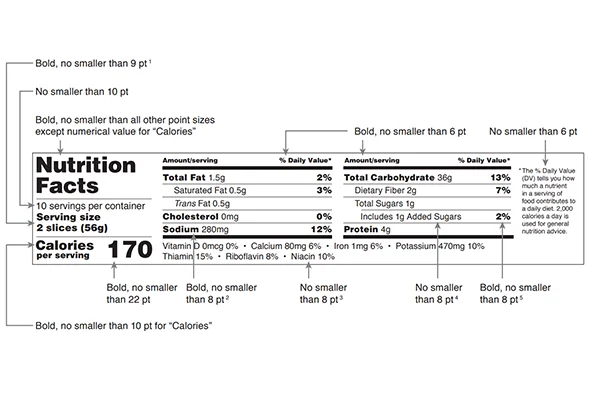
- Nutrition Facts: Bold, no smaller than all other point sizes except the numerical value for “Calories.”
- Serving Size: Bold, no smaller than 9 point.
- Calories: Bold, no smaller than 10 point.
- Calories – Numerical Value: Bold, no smaller than 22 point for the standard tabular format. Qualifying small-package tabular labels may use a minimum of 14 point.
- %Daily Value: Bold, no smaller than 6 point.
- Micronutrients: Bold, no smaller than 8 point.
Dual Column Display, Per Serving and Per Container
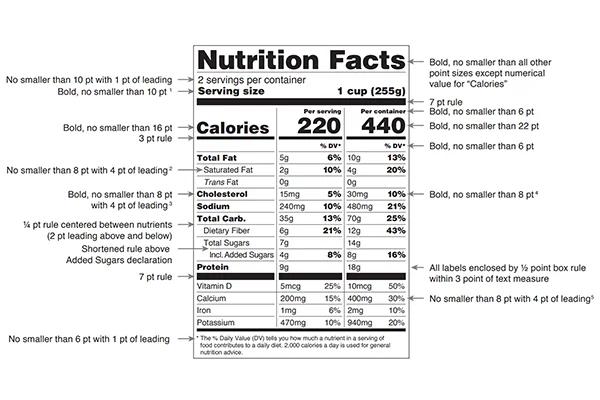
- Nutrition Facts: Bold, no smaller than all other point sizes except the numerical value for “Calories.”
- Serving Size: Bold, no smaller than 10 point.
- Divider: 7 point rule. These are example design specifications, not mandatory divider thicknesses.
- Calories: Bold, no smaller than 16 point.
- Calories – Numerical Value: Bold, no smaller than 22 point.
- Micronutrients: Bold, no smaller than 8 point with 4 point of leading.
Linear Format for Small or Intermediate-Sized Packages (with nutrients in 8-point font)
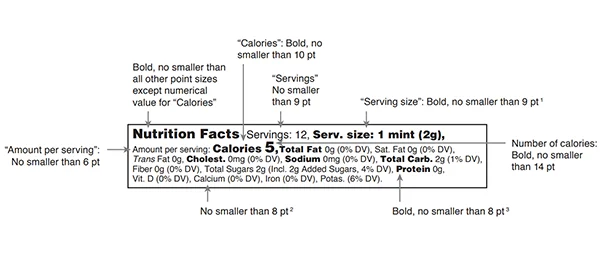
- Nutrition Facts: Bold, no smaller than all other point sizes except numerical value for “Calories.”
- Serving Size: Bold, no smaller than 9 point.
- Calories: Bold, no smaller than 10 point.
- Calories – Numerical Value: Bold, no smaller than 14 point.
- Micronutrients: Bold, no smaller than 8 point.
The linear format is available only to qualifying packages when the size or shape cannot accommodate the required nutrition information in a column or tabular display.
Dietary supplement label containing multiple vitamins
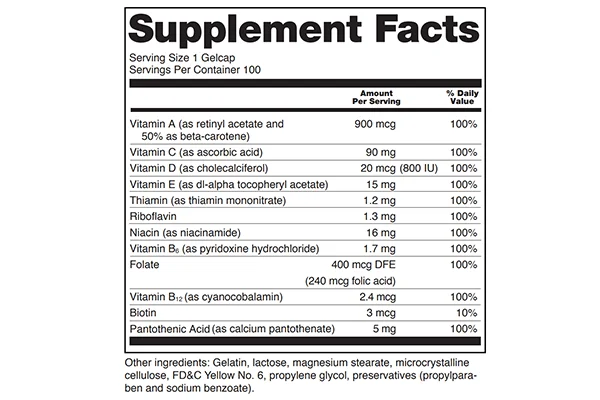
Supplement Facts labels follow separate FDA formatting requirements under 21 CFR 101.36. Minimum font sizes depend on package size, available labelling space, and the number of dietary ingredients declared. The smaller font sizes described below apply only to qualifying packages.
- Minimum font size for small packages: no smaller than 4.5 point for the “Supplement Facts” panel on the labels
- Minimum font size for intermediate-sized packages: The minimum font size is 6 points, except in certain cases: packages with 20 to 40 square inches of space that list over 16 dietary ingredients may use a font as small as 4.5 points. Similarly, packages smaller than 20 square inches may also use a 4.5-point type if they list more than 8 dietary ingredients.
- Tabular or linear format for an intermediate-sized package: A tabular format may be used if the shape or size of an intermediate-sized package doesn’t allow for vertical columns. A linear layout is permitted if the label still can’t fit a tabular format.
Avoiding FDA Non-Compliance with MenuSano
Creating a compliant nutrition label manually is risky and time-consuming. Missteps in font size or style, even by a fraction, can trigger compliance violations. This is where MenuSano comes in.
How MenuSano Simplifies FDA Nutrition Label Formatting
With MenuSano’s nutrition analysis software, food businesses can eliminate the guesswork. The software automatically generates FDA-compliant nutrition labels based on your recipe input. The system uses pre-configured templates that already meet FDA guidelines for:
- Font type
- Font size
- Bold formatting for key nutrients
- Proper alignment and spacing
- Bilingual label support
Enter your ingredients, measurements, and serving sizes. MenuSano handles the rest, instantly producing a professionally formatted, fully compliant Nutrition Facts or Supplement Facts Label with a fully generated ingredient list.
Read more: Full Guide to CFIA-Compliant Nutrition Label Fonts and Sizes
Official FDA References
The requirements discussed in this guide are based on 21 CFR 101.9 for Nutrition Facts labels and 21 CFR 101.36 for Supplement Facts labels.
For additional guidance, refer to the FDA’s Nutrition Facts Label Industry Resources.
Final Thoughts on Font and Size for Nutrition Labels
Creating compliant nutrition labels is not just about nutrition facts; it’s about presenting them correctly. Fonts and sizes are more than aesthetic choices; they are legal requirements that protect consumer health and ensure brand trust.
By following the precise rules for font style, size, spacing, and formatting, your business demonstrates a commitment to transparency and professionalism. MenuSano simplifies nutrition labelling by automating nutrition calculations and label formatting, helping food businesses create accurate, professionally formatted labels that support FDA compliance.