
Excel is often where food businesses start. Recipes are entered into spreadsheets. Nutrition information is added manually. Ingredient costs are tracked in another file. Allergen information might live in another tab, or another spreadsheet entirely.
For a small number of products, that can work.
But as a food business grows, the spreadsheet grows with it: more recipes, more ingredients, more nutritional data, more people making changes, and more versions of the same information.
Eventually, Excel stops simplifying the work and starts creating more of it.
For growing teams, spreadsheets aren’t built for food data management at scale, especially when recipe updates need to flow reliably into nutrition, allergens, costing, and label-ready outputs.
Key Takeaways
- Excel doesn’t understand relationships between ingredients, recipes, allergens, nutrition, costs, and labels; your team has to manage those links manually.
- Manual updates scale poorly: more products means more duplicated entry, more formula risk, and more inconsistency.
- Version sprawl (“FINAL_v2_UPDATED”) becomes a trust problem, not just an organization problem.
- Recipe changes create downstream work across nutrition, allergens, costing, and labelling; spreadsheets make impact analysis slow and error-prone.
- Growing food companies don’t just need “better spreadsheets”, they need a connected source of truth for food data.
Excel Works, Until You Need Food Data Management
In conversations with food businesses, we hear the same challenges repeatedly:
- “Ideally a database would eliminate all this manual work.”
- “We need one place for all the information.”
- “We need something more reliable.”
- “We’re constantly updating recipes.”
- “We’re managing hundreds of recipes.”
These aren’t really spreadsheet problems. They’re signs that a food company has outgrown a spreadsheet-based approach to managing food data.
Spreadsheets Don’t Model Food Data Relationships
Excel is an incredibly flexible tool. That’s exactly why so many food companies rely on it.
But a spreadsheet is fundamentally a collection of cells. It doesn’t inherently understand the relationships between ingredients, recipes, sub-recipes, nutrition data, allergens, recipe costs, and labels.
Food businesses do.
Consider a single ingredient change. That one update can affect multiple recipes and sub-recipes, and those changes can flow into:
- Nutritional values
- Allergen information
- Ingredient declarations
- Recipe costs
- Label content and compliance outputs
In a spreadsheet workflow, keeping those connections accurate often depends on someone finding and updating them manually. As operations become more complex, that becomes harder to do reliably.
“Ideally, a Database Would Eliminate All This Manual Work.”
Manual work is one of the biggest limitations of spreadsheet-based food data management.
Teams often find themselves repeatedly:
- Entering the same ingredient information
- Copying recipes between spreadsheets
- Updating nutrition values
- Checking formulas
- Recalculating recipes
- Updating labels
- Searching for the latest version of a file
- Making the same change in multiple places
Each task might only take a few minutes. Across hundreds of recipes, those minutes add up fast.
More importantly, every manual step creates another opportunity for data to drift out of sync.
A centralized food database changes the model. Ingredients and recipes become reusable data that feeds the rest of the workflow, so you’re not re-entering the same information repeatedly.
The goal isn’t simply to replace Excel. It’s to eliminate work that shouldn’t need to be repeated in the first place.
“We Need One Place for All the Information.”
As food companies grow, information tends to spread. One spreadsheet contains the master recipes. Another tracks nutrition. Another contains ingredient specifications. Someone else maintains costing. Labels are saved elsewhere.
Then come filenames like:
- Recipe_Master.xlsx
- Recipe_Master_FINAL.xlsx
- Recipe_Master_FINAL_v2.xlsx
- Recipe_Master_FINAL_v2_UPDATED.xlsx
The problem isn’t just finding a file. It’s knowing which information you can actually trust.
A centralized system creates a single source of truth for food data, connecting information such as:
Ingredients → Recipes → Nutrition → Allergens → Costs → Labels
Instead of maintaining separate versions of the same information, teams work from a common data source. That becomes critical when multiple departments need the same product data:
- R&D develops the recipe
- Nutrition/regulatory reviews values and compliance
- Operations needs standardized production recipes
- Marketing needs accurate label-ready information
They shouldn’t all need their own spreadsheet.
“We’re Constantly Updating Recipes.”
.
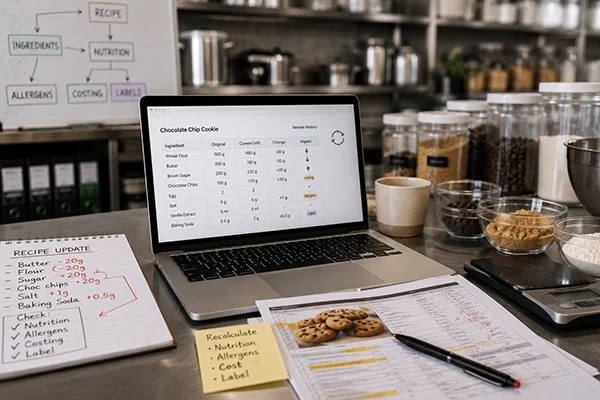
Recipes aren’t static. Suppliers change. Ingredients change. Portion sizes change. Products are reformulated. Costs fluctuate. Regulations and labelling requirements evolve.
A food company’s data has to evolve with it. The difficulty with spreadsheets is that one change can trigger a chain of manual updates.
Suppose an ingredient changes in a sub-recipe used across 25 finished products:
- Which recipes use it?
- Which nutrition calculations need updating?
- Does the allergen profile change?
- Do labels need to be regenerated?
When those relationships live primarily in spreadsheets, answering those questions can require searching through files, tabs, formulas, and recipe records.
In a connected food data system, those relationships can be managed systematically: update the underlying data, recalculate affected recipes, review the results, and generate updated outputs from the same source.
That’s a very different workflow than hunting through spreadsheets.
“We’re Managing Hundreds of Recipes.”
Excel can feel manageable at 10 recipes. At 50, things get more complicated.
At 500, the challenge isn’t storing recipes anymore; it’s managing a recipe database.
Food companies need to be able to:
- Find recipes quickly
- Reuse ingredients and sub-recipes
- Standardize data
- Analyze nutrition
- Identify allergens
- Manage revisions and approvals
- Generate labels and reports
- Keep information consistent across a portfolio
The number of relationships grows alongside the number of recipes. One ingredient may appear in dozens of products. One supplier change may affect an entire line. At that point, the question changes from: “Can Excel store our recipes?” to “Can we reliably manage our food data this way?”. Those are very different questions.
“We Need Something More Reliable.”
This may be the most important issue of all. Food data isn’t ordinary business data. It can determine what appears on a nutrition label, inform allergen information, and support regulatory and compliance decisions. Accuracy matters.
But spreadsheets often depend on manual processes:
- A formula gets overwritten
- A row isn’t included in a calculation
- An old version of a recipe gets used
- Someone updates an ingredient but not the other spreadsheet
- A value is copied incorrectly
There’s also another risk: organizational dependency. When only one or two people understand how the spreadsheets, formulas, and files fit together, the workflow becomes dependent on individual knowledge. If those people are unavailable or leave the organization, the process can become difficult to maintain.
The larger the operation becomes, the harder it is to build reliability around a workflow that depends on people remembering every downstream update.
A purpose-built food data system doesn’t eliminate the need for human review, but it gives teams a stronger foundation for that review by reducing duplicate entry, connecting related information, and creating more consistent processes.
The Real Shift: From Spreadsheets to Connected Food Data
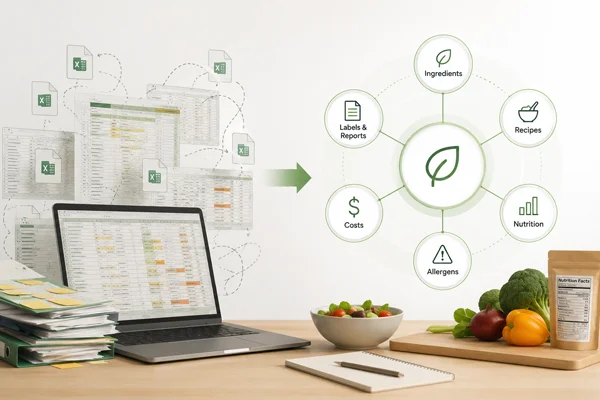
Moving beyond Excel isn’t really about replacing spreadsheets with another piece of software. It’s about changing how food information is managed. Instead of:
Recipe spreadsheet → nutrition spreadsheet → allergen spreadsheet → costing spreadsheet → label files
the workflow becomes connected:
Ingredients → Recipes → Nutrition Analysis → Allergens → Costing → Labels & Reports
The information entered at the beginning becomes useful throughout the rest of the process, without being retyped, copied, or revalidated across disconnected files. That means less duplicate entry, fewer version conflicts, and a clearer path from recipe development to finished product outputs.
When Has Your Food Business Outgrown Excel?
You don’t need to abandon spreadsheets simply because your business uses them. But there are signs the workflow deserves another look.
Common signs you’ve outgrown Excel-based food data management:
- Multiple versions of the same recipe file (and no clear “source of truth”)
- Manual nutrition and allergen updates after every recipe change
- No clear audit trail or revision control
- Different departments maintaining different “truths”
- One person who “knows how the spreadsheet works”
- Slow impact analysis when an ingredient or supplier changes
If your team is maintaining hundreds of recipes, entering the same information in multiple places, struggling to identify the latest version, or relying on manual updates to keep nutrition, allergens, and labels accurate, you’ve likely moved beyond a spreadsheet problem. You have a food data management problem. And that’s exactly what one food business told us: “We need one place for all the information.” That may be the simplest way to describe what growing food companies actually need. Not another spreadsheet. A connected source of truth.
Manage Your Food Data in One Place
MenuSano brings recipe management, nutrition analysis, allergen information, recipe costing, nutrition labels, and reporting into one connected platform.
Build and update recipes once, analyze nutritional information, manage the data behind it, and turn results into the labels and reports your team needs, without maintaining a collection of disconnected spreadsheets.
The shift isn’t about abandoning Excel. It’s about building a single source of truth your team can trust as products, suppliers, and regulations change.
When your recipes, nutrition, allergens, costing, and label outputs stay connected, updates stop turning into cleanup, and your team gets back time, consistency, and confidence in the numbers behind every product.
That’s the approach MenuSano is built around: one place to manage recipes, nutrition analysis and labelling, allergen management, recipe costing, and much more, so changes don’t create chaos downstream.